


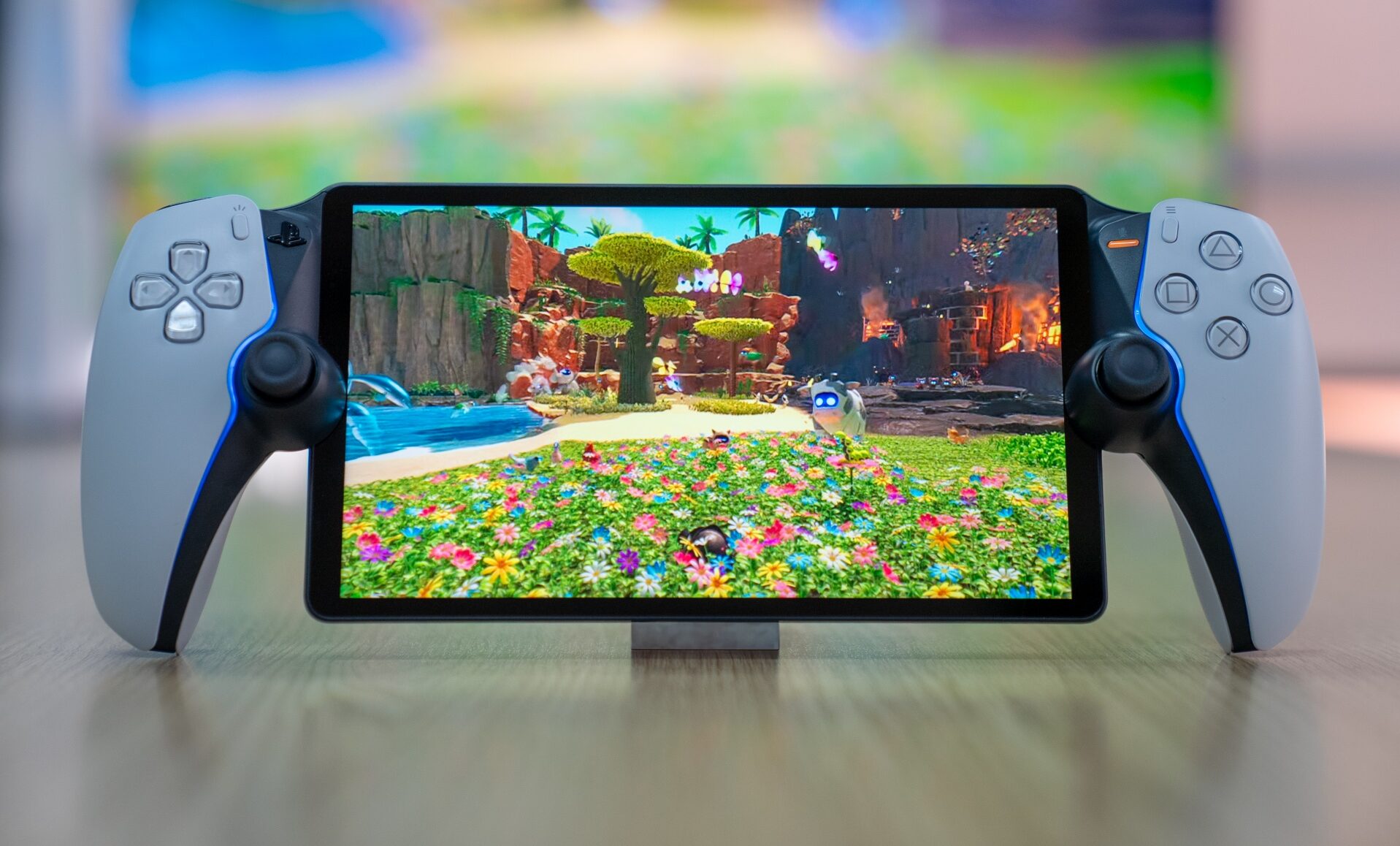
A Handheld That Isn’t What You Expect
The moment the playstation portal was announced, reactions split the gaming community right down the middle. Some players saw it as a clever extension of the PS5 ecosystem. Others dismissed it as an overpriced screen with buttons. That tension is exactly why this device deserves a careful, experience-driven review rather than quick hot takes.
This is not another flashy gadget trying to replace your console. The playstation portal takes a very different approach, one that depends heavily on how, where, and why you play games. After spending real time with it, testing it across different networks, rooms, and play sessions, one question matters most: is Sony’s handheld actually worth it?
Let’s break it down honestly, without hype, without brand loyalty, and without technical jargon overload.
What Is the PlayStation Portal, Really?
At its core, the playstation portal is a dedicated remote play device built for PlayStation 5 owners. It does not run games locally. Instead, it streams gameplay directly from your PS5 over Wi-Fi.
Think of it as your DualSense controller split in half, wrapped around a sharp 8-inch LCD screen, designed specifically for PS5 streaming. That simple idea shapes everything about the experience, from strengths to limitations.
Key Concept in Simple Terms
-
Your PS5 does the heavy work
-
The playstation portal mirrors your PS5 screen
-
You must have a strong internet connection
-
It works best inside the PlayStation ecosystem
This clarity is important because disappointment often comes from expecting the wrong thing.
Design and Build Quality: Familiar but Purposeful
Sony rarely misses when it comes to hardware design, and the playstation portal continues that trend.
Ergonomics That Feel Instantly Right
If you’ve used a DualSense controller, your hands already know what to do. The grips are comfortable, the weight is well balanced, and long sessions do not cause wrist fatigue. The analog sticks, triggers, and buttons feel premium and responsive.
Display Quality
The 8-inch 1080p LCD screen is bright, crisp, and colorful. Text is readable. HUD elements remain sharp. Even fast-moving games retain clarity when the connection is stable.
However, it’s not an OLED display, which may disappoint players used to deeper blacks. That said, in normal lighting conditions, the screen performs very well.
Setup Experience: Simple but Not Foolproof
Setting up the playstation portal is mostly straightforward.
What Works Well
-
Quick pairing with PS5
-
Clear on-screen instructions
-
Minimal account setup
Where Friction Appears
Network quality makes or breaks the experience. If your Wi-Fi router struggles, you’ll feel it immediately. Lag, compression artifacts, or input delay are not device flaws but network realities.
This device rewards preparation. A strong router, stable internet speed, and low network congestion make a dramatic difference.
Performance: The Heart of the Debate
Performance is where opinions on the playstation portal diverge the most.
When Everything Goes Right
With a strong Wi-Fi connection, gameplay feels surprisingly close to native console play. Input latency is low. Frame pacing is smooth. Audio remains synchronized.
Action games, racing titles, and even shooters feel playable, which is impressive for a streaming-based handheld.
When Conditions Aren’t Ideal
Even slight network instability can introduce stutter or resolution drops. Competitive online gaming becomes less reliable. Public Wi-Fi environments are hit or miss.
In short, the playstation portal does not forgive weak networks.
Audio and Immersion
The built-in speakers are decent but unremarkable. Where the device shines is headphone support.
PlayStation Link Advantage
Sony’s wireless audio integration offers near-zero latency when paired with compatible headsets. This dramatically improves immersion and makes the device feel more premium.
Wired headphones also work flawlessly, giving players flexibility without sacrificing sound quality.
Battery Life: Adequate but Not Outstanding
Battery performance lands firmly in the “acceptable” category.
-
Average playtime: 4 to 6 hours
-
Fast charging support
-
USB-C convenience
For couch gaming, travel breaks, or casual evening sessions, battery life is sufficient. For long trips, you’ll want a power bank.
Who the PlayStation Portal Is Perfect For
This device is not designed for everyone, and that’s okay.
Ideal Users
-
PS5 owners who share a TV
-
Players who game around the house
-
Parents who want flexible playtime
-
Gamers who value comfort over portability
If you often lose access to your main screen, the playstation portal solves a real problem.
Who Should Skip It
Being honest also means acknowledging limitations.
Not Ideal For
-
Players without reliable Wi-Fi
-
Gamers seeking offline play
-
Competitive esports players
-
Those expecting a standalone console
If your lifestyle doesn’t match the use case, frustration will follow.
Comparison With Other Handheld Options
The handheld gaming market has grown fast, so context matters.
Versus Mobile Remote Play
Phones can stream PS5 games, but controls feel compromised. Touch screens lack precision. External controllers add bulk. The playstation portal wins on comfort and integration.
Versus PC-Based Handhelds
PC handhelds offer local processing and flexibility but require technical setup and maintenance. Sony’s approach prioritizes simplicity and consistency.
Different tools for different players.
Software Experience and Updates
Sony’s software philosophy here is conservative.
Strengths
-
Clean interface
-
Fast boot times
-
Stable firmware
Weaknesses
-
Limited customization
-
No local apps or media features
-
Entirely dependent on PS5 ecosystem
Future updates may expand features, but expectations should remain grounded.
Price vs Value: The Real Question
Is the playstation portal expensive? On paper, yes. Is it overpriced? That depends on how much you use it.
For someone who plays daily and values flexibility, the price can justify itself quickly. For occasional users, it may feel unnecessary.
Value is personal, not universal.
Trust, Brand, and Sony’s Long Game
Sony is clearly testing a new hardware category. Rather than chasing raw power, this device strengthens ecosystem loyalty.
That strategy mirrors how Sony has historically approached accessories: focused, refined, and targeted at existing users.
Whether this leads to future standalone devices remains to be seen.
Pros and Cons Summary
Pros
-
Excellent ergonomics
-
Sharp, responsive display
-
Seamless PS5 integration
-
Low latency on strong networks
Cons
-
No offline gameplay
-
Network-dependent performance
-
Limited standalone features
-
Average battery life
Is the PlayStation Portal Worth It? Final Verdict
The playstation portal is not a revolutionary handheld, and it doesn’t try to be. Instead, it solves a specific problem extremely well. When used as intended, it delivers comfort, convenience, and surprisingly strong performance.
If your gaming life already revolves around your PS5 and your home network is reliable, this device can genuinely improve how often and how comfortably you play. However, if you expect freedom from internet dependence or standalone functionality, disappointment is inevitable.
In the end, the playstation portal succeeds by knowing exactly what it is and refusing to pretend otherwise.
Conclusion: A Focused Device for the Right Player
The playstation portal won’t replace your console, and it won’t redefine handheld gaming. What it will do is give PS5 owners a new kind of flexibility that feels natural, polished, and thoughtfully designed.
If your lifestyle matches its strengths, it’s absolutely worth considering. If not, it’s smart to wait. Either way, this device represents an interesting shift in how Sony thinks about modern gaming habits.
If you’ve tried the playstation portal, share your experience. Honest discussions help gamers make better decisions, and this is one device where personal use truly shapes the verdict.











Leave a Reply